

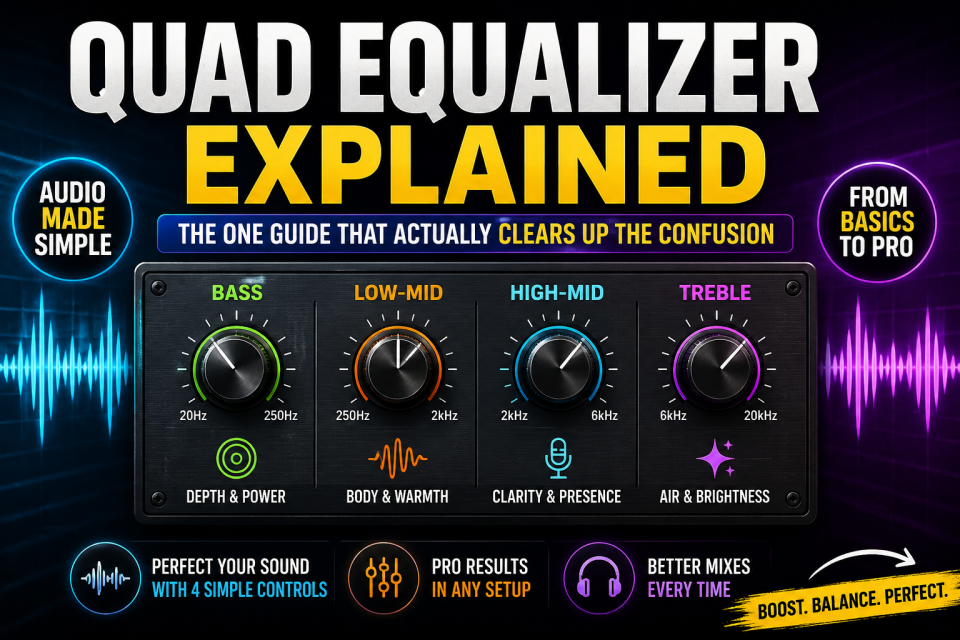
Here’s a fun little trap. Type “quad equalizer” into Google, read the first five results, and walk away more confused than when you started. That’s not you being dense – it’s the term itself. It genuinely means different things depending on which corner of the internet you landed in, and almost nobody bothers saying that out loud before diving straight into their explanation. So let’s fix that first, then get into the good stuff.
This is the same naming mess we untangled in our guide on image search techniques – one term, several unrelated methods hiding behind it, and the answer depends on what you’re actually trying to do.
The short version: in audio, “quad equalizer” is code for one of two things. Either a simple four-band tone control – bass, low-mid, high-mid, treble – the kind of thing you’d twist on a car stereo. Or a chunk of professional hardware packing four independent EQ channels into one box, the discontinued-but-still-beloved Mackie Quad EQ being the classic example. Wander outside audio entirely, though, and the same two words mean something else in electronics. There, it’s a chip that fixes signal loss across four data lines. No sound involved whatsoever. Which meaning you need depends on where you bumped into the phrase.
Quad Equalizer: Quick Breakdown
Three flavors, in plain terms.
A four-band audio tone shaper. A piece of four-channel EQ hardware for handling four signals independently. Or, off in electronics and networking, a signal-correction chip with nothing to do with sound.
If you searched this term, odds are you want the audio meaning. That’s where most of this guide lives. The electronics detour gets one short section further down, for anyone who landed here chasing a DisplayPort chip by accident.
The Two Real Meanings of a Quad Equalizer in Audio
The Four-Band Tone Control
Start with the one nearly everyone actually means: the four-band tone control. You’ll find it wired into car stereos, home receivers, headphone apps, and budget mixers. Basically anywhere an engineer decided a single bass/treble knob was too blunt a tool. Four controls, each aimed at its own slice of the frequency range. Simple enough that your uncle could use it in the car without reading a manual. Precise enough to actually rescue a mix that sounds obviously off.
The Professional Four-Channel Hardware
Then there’s the pro-audio version, and this is where things get more interesting. The clearest example is the Mackie Quad EQ, a rack-mount digital unit from the mid-2000s. It crams four independent 30-band graphic equalizers into a single box, one per input, each running completely on its own. Picture a live sound engineer working a show with four separate feeds – main left, main right, two monitor mixes. That engineer would rather not lug around four different units just to shape each one. That’s exactly the problem this thing was built to solve. Mackie stopped making it years ago. Secondhand units still trade hands regularly, though, and the name still gets typed into search bars more than you’d expect for a discontinued product.
This split – consumer tone control on one side, pro-grade hardware on the other – is really the whole reason search results on this term feel like they’re arguing with each other. A car audio blog post and a live-sound engineer’s manual are both completely correct. They’re just not answering the same question.
What Does a Quad Equalizer Mean Outside of Audio?
Quick side trip, since the phrase does show up here too. In electronics and data transmission, “quad equalizer” describes chips built to compensate for signal loss across four separate data lines. Texas Instruments, for instance, sells a programmable quad equalizer for DisplayPort and similar high-speed links under almost exactly that name. If that’s what actually brought you here, apologies – wrong page. That’s a signal-integrity component, and it has nothing to do with how anything sounds.
The Four-Band EQ Frequency Ranges, With Real Numbers
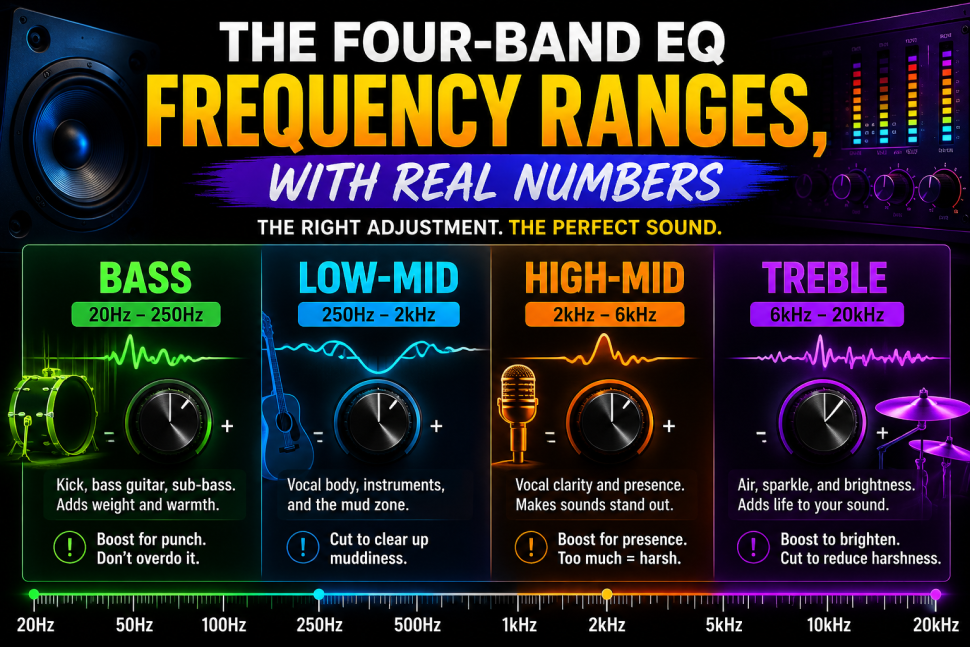
This is the part most guides either skip or hand-wave through, which is a shame. It’s the most useful section on the page. Here’s roughly how a typical four-band EQ divides up the audible spectrum.
Bass, Low-Mid, High-Mid, and Treble
Bass
lives around 20 to 250 Hz – kick drum weight, bass guitar, sub content, the stuff you feel as much as hear. Push it up and you get thump and warmth, and honestly it does wonders for small or bass-shy speakers. It’s also the easiest band on the whole unit to overdo, especially if the source already has plenty going on down there.
Low-mid
covers roughly 250 Hz to 2 kHz – vocal body, guitar and piano fundamentals, and, inconveniently, most of the mud too. Overdo this band and a mix starts sounding boxy and congested, like it’s playing through a closed door. If something sounds cluttered or unclear, this is almost always the first place to cut. Not boost. Cut.
High-mid
sits around 2 kHz to 6 kHz, home to vocal clarity and presence. This is the range of consonant sounds that make speech intelligible instead of mush. A light boost here helps a vocal punch through a crowded mix. Push too hard, though, and it turns harsh and fatiguing – the kind of sound that makes you want to turn the whole thing down after twenty minutes.
Treble
takes the top, roughly 6 kHz up to 20 kHz – air, sparkle, cymbal shimmer, the sound of a room’s brightness. Boost it to wake up something dull. Cut it to calm down sibilance or a recording that’s a little too sharp for comfort.
None of these boundaries are laser-precise. They shift a bit device to device. But they’re close enough to work from on virtually anything with four labeled bands.
Graphic vs. Parametric Quad Equalizer – Which One Are You Actually Using?
Knowing your EQ has four bands doesn’t actually tell you how each band behaves – and that gap trips people up more often than it should.
A graphic-style quad EQ hands you four fixed frequency points, one slider each. Fast, intuitive, a little blunt – what you see is roughly what you get. A parametric quad EQ goes further. It lets you slide the center frequency of each band around, and often adjust its bandwidth too, which audio folks call Q. Yamaha’s own breakdown of parametric EQ describes it as control over frequency, gain, and Q together. A higher Q narrows your adjustment down to a tight, surgical range. A lower Q spreads the effect out wide. That extra control earns its keep when a problem is narrow and specific – one instrument ringing at a single ugly frequency, say. A graphic EQ already handles broad tonal issues just fine, but it isn’t built for that kind of precision.
Neither one beats the other outright. Graphic quad EQs are for quick, broad shaping, when you just want things to sound generally better. Parametric ones are for the precise stuff, when you need to grab exactly one frequency and leave everything around it alone.
Practical Quad Equalizer Settings for Common Situations
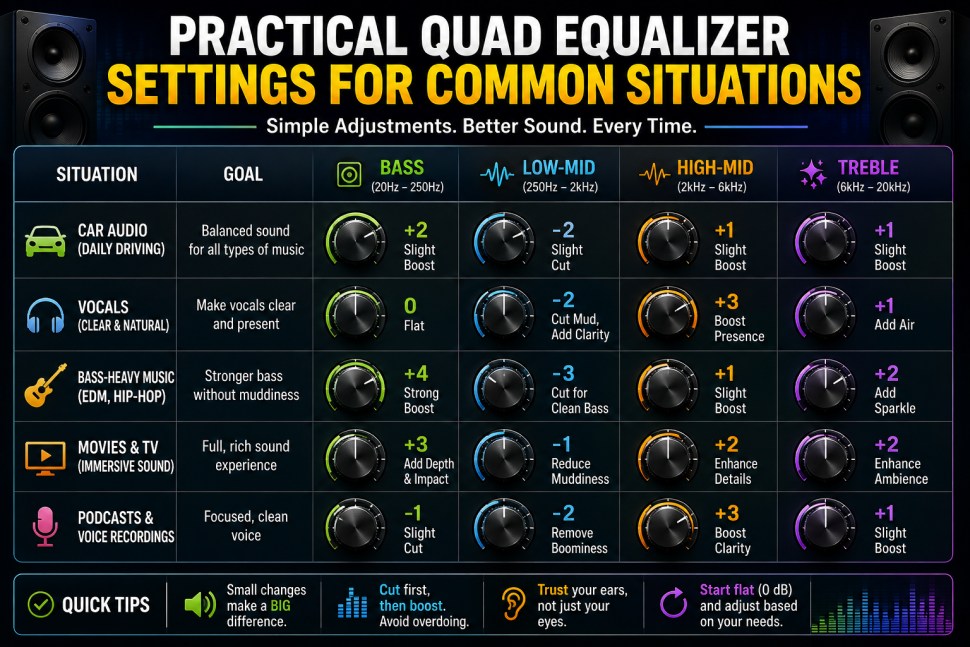
Mix sounding muddy? Cut low-mid slightly, somewhere around 300 to 500 Hz, before you even touch the bass knob. Mud almost always hides in the low-mids, not the sub-bass everyone instinctively blames.
Vocals sounding thin or buried? A small boost around 3 to 5 kHz in the high-mid range brings them forward without tipping into harsh.
Stuck with small or laptop speakers? A modest bass boost helps paper over what the hardware physically can’t reproduce. It’s a workaround, though, not a cure. The speakers are still small.
Recording sounds harsh or spitty on the S’s? Cut treble slightly rather than reaching for high-mid. Sibilance and general harshness actually live in slightly different ranges, so treble is usually the sharper fix.
One rule ties all of this together, and it’s worth remembering: cut before you boost. It’s gentler on the ears. It’s also far less likely to cause new problems than stacking gain everywhere something sounds off.
Quad Equalizers in Car Audio Specifically
Car audio earns its own section because it’s probably the single biggest reason people search this term. Car cabins are acoustically brutal in ways most people never think about – road noise chews into the low end, glass and hard surfaces bounce highs around unpredictably, and speaker placement gets dictated by wherever the manufacturer could squeeze one in, not where it would actually sound best. A four-band EQ built into a stereo or aftermarket head unit exists specifically to fight back against all of that.
A solid starting point: a small bass boost to counter road noise swallowing the low end, and a slight low-mid cut to tame cabin boominess. Add a modest high-mid boost to keep vocals audible over engine and wind noise. Then a light treble adjustment, depending on how bright or dull the factory speakers sound to begin with. None of this replaces actually upgrading speaker quality or fixing placement. But if you’re working with what came in the car, it’s a genuinely useful place to start.
Frequently Asked Questions
What does “quad” mean in quad equalizer?
Just four. Four bands in the consumer/audio sense, or four independent channels in the professional hardware sense, depending on which device you’re holding.
Is a quad equalizer the same as a graphic equalizer?
Not quite. “Quad” tells you how many bands or channels exist. Graphic versus parametric tells you how each band actually behaves once you start turning knobs. A quad equalizer can technically be either type.
What’s the Mackie Quad EQ, exactly?
A discontinued rack-mount unit built for live sound. Four independent 30-band graphic equalizers in one box, made for engineers juggling several signals at once. Used units still show up on the secondhand market fairly often.
Should I boost or cut on a four-band EQ?
Cut, nearly every time. It’s the safer, more transparent move. Save boosting for once you’ve confirmed cutting elsewhere hasn’t already solved the problem.
Is a quad equalizer actually good for car audio?
Yes. A basic four-band EQ genuinely helps correct a car’s specific acoustic problems. It works best alongside decent speakers, though, not as a substitute for bad ones.
Does “quad equalizer” ever have nothing to do with sound?
Sometimes, yes. In electronics and data transmission it also describes signal-equalizer chips correcting data loss across four channels. That’s a completely different world from audio.
Bottom Line
“Quad equalizer” was never one single thing. Treating it like it is happens to be exactly why search results on this term feel like they can’t agree with each other. In audio, it’s either a simple four-band tone shaper or a piece of professional four-channel hardware. Figuring out which one applies to your situation matters a lot more than memorizing a dictionary definition. Once that part’s sorted, the rest is genuinely simple. Find the frequency range causing the actual problem. Cut before you boost. Move in small steps instead of dramatic swings.
For more explainers like this one, browse the rest of our Technology section.
Cảm ơn bài viết. Với dịch vụ du học Hàn Quốc chuyên nghiệp, Letco giúp bạn tiết kiệm thời gian và chi phí chuẩn bị hồ sơ. Truy cập letco.vn để biết thêm.
Casino Torremar (https://Fashionfitnessbeauty.Com/Donde-Puedo-Encontrar-Informacion-Sobre-Los-Casinos/) winner bono gratis