

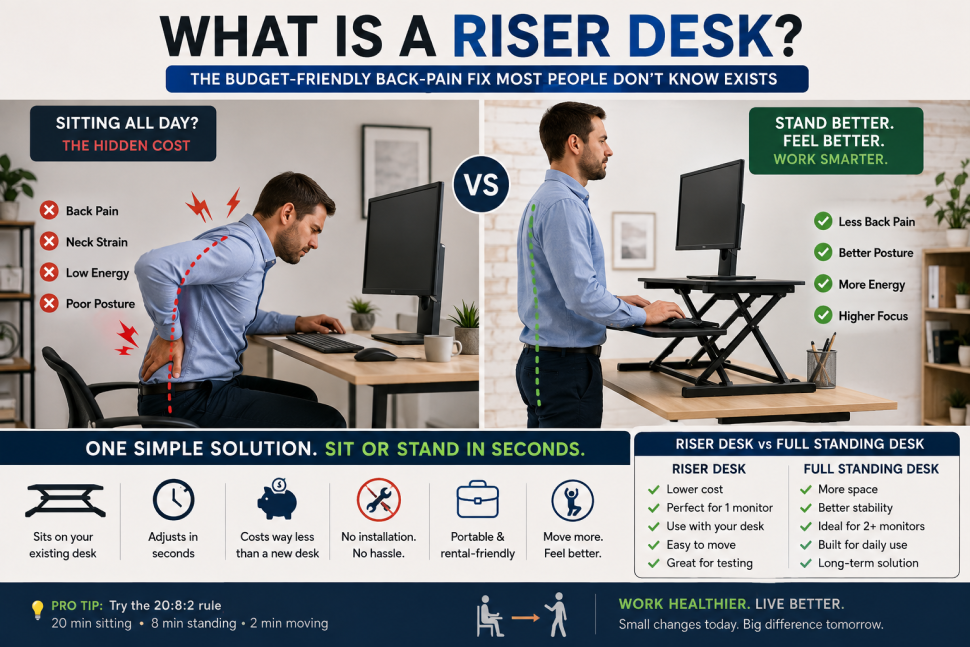
Your lower back starts screaming around hour three. Shoulders creep up toward your ears. You shift in your chair for the tenth time trying to find a position that doesn’t hurt, and somewhere in the back of your mind you’re thinking: there has to be a better way to do this without dropping hundreds of dollars on a whole new desk. A riser desk is usually that better way – and most people who need one have no idea it exists.
There is. It’s called a riser desk, and most people who need one have no idea it exists – or assume it costs as much as a full standing desk. It doesn’t, not even close. Here’s exactly what it is, how it actually works, and whether it’s the right fix for your setup or just a stepping stone before you buy something bigger.
In short: a riser desk – also called a desk riser, standing desk converter, or desk converter – is a height-adjustable platform that sits on top of your existing desk. It raises your monitor, keyboard, and mouse to standing height, then lowers back down when you want to sit. No installation, no new furniture needed. Basically a desk stacked on a desk.
What Is a Riser Desk, Exactly?
Here’s what trips people up. A riser desk doesn’t replace your desk, it works with it. A full standing desk is its own motorized unit that lifts the entire desktop as one piece. A riser desk skips all that – sits on the desk you already own, carries your monitor and peripherals, adjusts from there.
Quick terminology note since the market’s inconsistent about it. “Riser desk,” “desk riser,” “standing desk converter,” “desk converter” – all the same product. Different brands, different marketing names, same thing.
Why People Actually Use a Riser Desk
Sitting for long uninterrupted stretches is hard on the spine, and by a fair amount too. Research on spinal loading found seated posture can put close to 90% more pressure on the lower back’s discs than standing does. Standing spreads body weight more evenly and keeps the spine’s natural curve intact.
There’s a rule ergonomists mention a lot, the 20:8:2 rule. Twenty minutes sitting, eight minutes standing, two minutes actually moving – walking, stretching, whatever. None of that works if switching positions is annoying, though. That’s the actual problem a riser desk solves. Turns “rearrange my whole desk” into something that takes five seconds.
There’s a second reason people don’t talk about as much: neck strain. Monitor sits too low, you tip your head forward to compensate. Do that for eight hours a day, five days a week, and it adds up into real tension, even in people with otherwise decent posture. Raise the screen so the top third hits eye level instead of the center, and that forward lean just goes away. Honestly, for a lot of people this is the more noticeable benefit, more than the back-health argument everyone leads with.
Manual vs. Electric
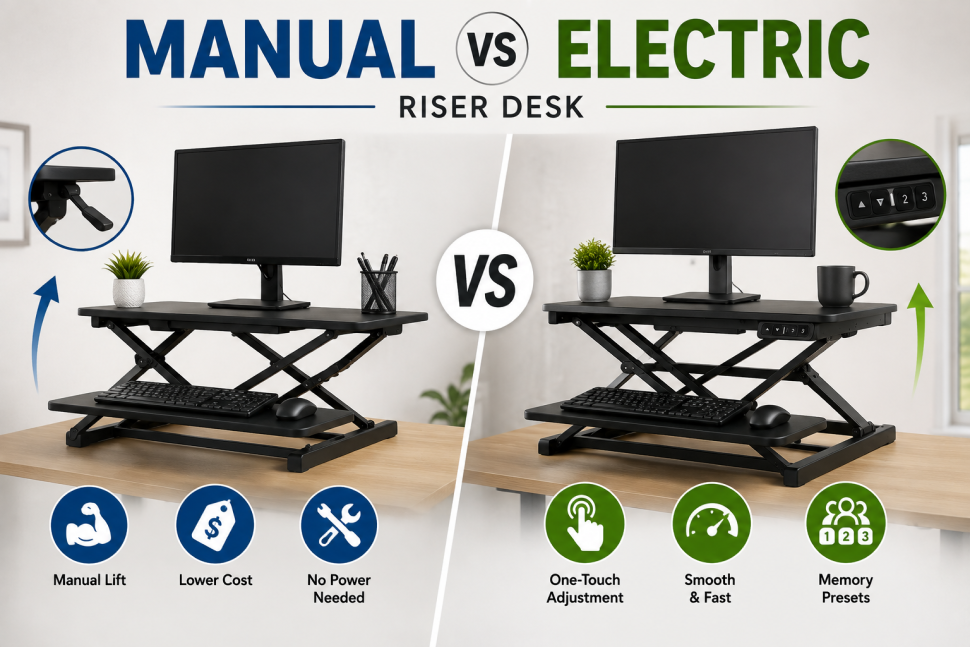
Two basic types.
Manual ones use a spring lift, a pneumatic gas lift, or a hand crank – you physically move a lever or handle to adjust height. Cheaper, simpler mechanically, fewer parts to break. Downside is precision takes more effort than just pressing a button.
Electric ones use a motor, controlled by a button or touch panel, gliding to whatever height you’ve set. More convenient if you shift positions a lot during the day. Costs more, and you need an outlet nearby.
There’s also single-tier versus two-tier. Single-tier gives you one shelf, just for the monitor. Two-tier adds a separate, lower level for keyboard and mouse, which tends to feel better for actual typing since your hands sit at a more natural angle than on one flat surface.
Riser Desk or Full Standing Desk
This is really what most people searching this topic actually want answered.
Get a riser desk if you want to test whether standing while working helps before spending real money on furniture, if you’ve only got one monitor, if you like the desk you already have, or if you need something portable – shared office, rental, that kind of setup.
Get a full standing desk if you’re running two or more monitors, using a docking station or accessories that need surface space, planning to stand for a real chunk of every workday long-term, or if stability genuinely matters to you. Riser platforms get wobblier as weight and height go up.
The trade-off with any riser desk: it eats into the desk surface underneath it. A dual-monitor setup pushes most riser platforms close to their limit. A standing desk gives you the whole desktop, built to handle that load from the start.
Practically – testing the idea out, or working with one screen, riser desk makes sense. Already know you’ll be standing daily with a real multi-monitor setup? Probably cheaper long-term to just buy the standing desk now instead of replacing a riser desk in a few months.
What Actually Matters When Buying a Riser Desk
Most guides skip this. Weight capacity should be checked against everything going on the platform, not just the monitor alone – keyboard, laptop, whatever else lands there. Surface width needs to match your setup; single-monitor riser platforms usually run 24 to 32 inches. Height range matters more than people think – check the max against your own height, not some generic average on the box. Lift mechanism decides price and convenience, covered above. One-tier versus two-tier changes how typing actually feels over a full day.
One thing that gets missed a lot: check your desk’s depth. Bigger riser units sometimes need a deeper desk than the standard 24 inches most desks have, and that’s easy to overlook until it just doesn’t fit.
Setting Your Riser Desk Height Right
Buying a riser desk and setting it at some random height kind of defeats the point. Standing, elbows should be around a 90-degree angle, forearms roughly parallel to the floor. Monitor’s top third should hit eye level, not the middle of the screen. Tilting your chin down, or reaching up to type – both mean the height’s off, and it’s worth fixing right away instead of just living with it.
Pros and Cons, Honestly
For it: costs a lot less than a full standing desk, no installation, works with furniture you already have, easy to move or remove.
Against it: surface space is limited, so more than one monitor or bulky accessories get cramped fast. Stability drops as weight and height go up, and a wobbly desk mid-task gets old quickly. Since it sits on top of your existing desk, the combined height needs to actually work in your space – low ceiling, or an already-tall desk, and the math can stop making sense.
When to Skip a Riser Desk
If you already know you’ll be standing most of most days, a riser desk is often something you outgrow in a few months. Same with multi-monitor setups or docking stations – you’ll hit the space limit fast. In both cases it’s usually cheaper to just get a proper standing desk from the start instead of buying something you’ll replace soon anyway.
Riser Desk Questions People Ask
What’s a riser desk used for?
Adding sit-stand flexibility to a desk you already have, without replacing it.
Same thing as a standing desk converter?
Yes, identical product, just different names depending on brand.
Cost?
Riser desks typically run $100 to $600 depending on size, mechanism, and build quality. Gas-spring manual models usually land between $130 and $350. Electric models with memory height presets run $400 to $600. Compare that to a full standing desk, which often starts around $300 and climbs well past $900 for premium options – the price gap is exactly why a riser desk works as a lower-commitment first step.
Can it hold two monitors?
Some can, but check weight capacity and width first – dual-monitor setups push most riser platforms close to their limit.
Worth it versus a full standing desk?
For occasional use, or figuring out if standing even works for you, yes. Daily long-term multi-monitor use, standing desk’s the better buy.
Do they wobble?
Cheaper ones can, especially loaded past their rated capacity. Check that spec and look for reviews mentioning stability specifically.
Bottom Line
A riser desk is still the easiest, cheapest way to get some standing time into your workday without replacing furniture. Won’t match a full standing desk for stability or space once more than one monitor’s involved, but for a single screen, or just testing whether standing helps before spending real money, it’s usually the right first move. For more on setting up a healthier workspace, see our related guide on ergonomic office setups.
Based on current ergonomics research and product specs as of 2026. For broader guidance, the Mayo Clinic’s office ergonomics guide has more depth.
This resource simplifies the process to sell bitcoin in india efficiently.
This really is a great written piece! Ive truly bookmarked it and
posted it out to almost all of my buddies simply because I know they
are curious, thank you very much!
Im no professional, but I feel you just crafted the best point.
You naturally understand what youre talking about, and I can actually
get behind that. Thanks for staying so upfront and so truthful.
Amazing! Its in fact awesome post, I have got much clear idea about
from this post.
I was able to find good advice from your blog posts.